If you’re planning to buy the newest Surface Pro or Surface Laptop, you may be stuck choosing between two options: Snapdragon X or Intel Lunar Lake. Microsoft now offers Surface devices with both Qualcomm’s Arm-based Snapdragon X chips and Intel’s latest Lunar Lake processors. On paper, both promise longer battery life, faster AI performance, and a cooler, quieter experience. But the best option really depends on how you use your device now—and how you plan to use it in the future.
In this guide, we’ll break down how each platform works in simple term Which Processor Truly Wins? what real-world performance and battery results actually mean, and how Windows on Arm compares to traditional x86 systems. We’ll also help you decide with clear recommendations for different users like everyday users, creatives, students, developers, and gamers. Plus, we’ll highlight some practical issues—like app compatibility and small bugs—you should understand before making your final choice.
How Well Snapdragon X and Intel Lunar Lake Work with Adobe Creative Suite
Adobe Photoshop now offers native ARM64 support on Snapdragon X Elite devices, allowing it to run efficiently without relying on emulation. In contrast, Adobe Lightroom Classic does not currently have a native ARM version and runs through emulation, which can limit performance, disable GPU acceleration, and restrict some features.
Adobe Lightroom (the cloud-based version) provides improved ARM compatibility compared to Lightroom Classic, but it still does not fully support GPU acceleration on Windows ARM systems.
For professional photo editing workflows that depend heavily on Lightroom Classic, Intel Lunar Lake offers a much better experience, with full native performance, complete GPU acceleration, and smoother overall operation.
Why the Processor Is the Most Important Factor in a Photo Editing Laptop
A photo editing laptop may look powerful on paper based on its specifications, but it can still feel slow once you start real editing work. This is usually not related to the camera quality. The main factor is the processor, which handles most of the heavy work in the background.
Every time a RAW file is opened, the processor must decode a large amount of data. When you zoom in, apply noise reduction, or use tools in Photoshop that detect skies or subjects automatically, many calculations are performed on the device.
There is a lot of processing involved. The ideal processor for photo editing is one that allows smooth, uninterrupted workflow, without overheating or quickly draining the battery.
Because of this, the comparison between Snapdragon and Intel Lunar Lake for photo editing laptops has become increasingly important. A thin Windows laptop powered by Intel Lunar Lake can behave quite differently from an ARM-based Snapdragon device when it comes to real-world editing performance.
Real-World Editing Experience in Lunar Lake Processor in 2026
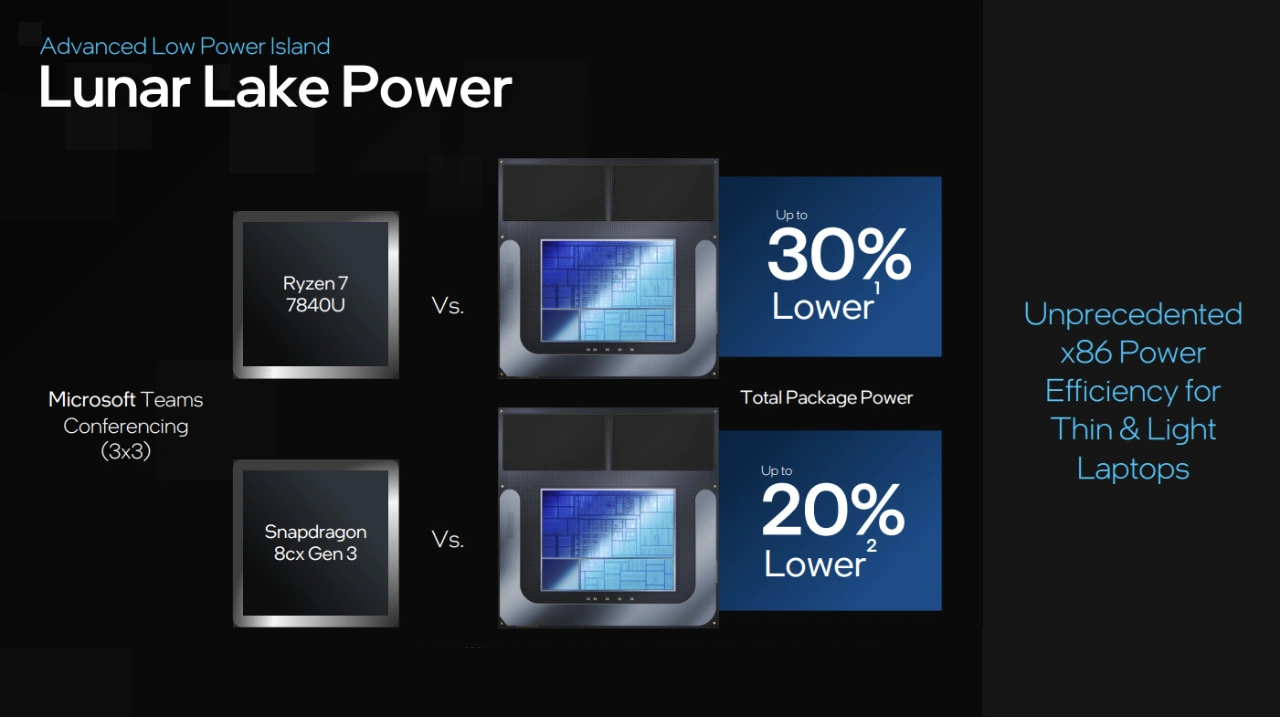
Using a Lunar Lake processor for image editing often feels smooth and stable. In real use, the experience is best described as “calm.” When you import a folder of RAW images, previews load quickly, and the system does not feel overloaded even during heavier tasks.
On thin Windows laptops powered by Intel Lunar Lake—such as models from Dell XPS, Lenovo Yoga, or ASUS Zenbook—the workflow remains consistent and responsive. Applications like Photoshop open quickly, and adjusting settings feels immediate and fluid.
AI-powered tools also perform efficiently. Tasks like subject selection, sky masking, and noise reduction are processed locally on the device rather than relying on cloud services. This helps reduce delays and keeps the editing experience fast and uninterrupted.
Intel Lunar Lake benefits significantly from this on-device processing approach, especially in Photoshop and similar creative applications. However, like any platform, it is not without limitations. Early-generation devices may have some constraints, and availability is still expanding.
CPU Responsiveness
- Snapdragon X: Excellent day-to-day responsiveness, especially in lightweight tasks and UI interactions. Its ARM design keeps things smooth and efficient, especially for general editing and quick tweaks.
- Lunar Lake: Often edges ahead in sustained heavy workloads like batch exports, complex filters, and multi-layer adjustments. In benchmark comparisons, Lunar Lake shows strong single-core performance, which helps with Photoshop responsiveness.
Graphics (GPU) Performance
Photo editing tools increasingly use GPU acceleration for effects, previews, and AI tools.
- Snapdragon X: Integrated graphics are adequate for basic creative tasks but generally weaker than Intel’s latest integrated solutions.
- Lunar Lake (Xe2 iGPU): Offers a significant uplift in graphics performance compared to Snapdragon X. This helps with accelerated effects, previews, and light GPU-assisted tasks.
AI Acceleration
AI features — like subject selection, sky replacement, and intelligent masking — are now part of modern editing tools.
- Snapdragon X: Up to ~45 TOPS (Tera Operations Per Second) of AI performance.
- Lunar Lake: Up to ~48 TOPS of NPU performance, with Intel combining NPU and GPU acceleration to push AI workloads further.
In practice, both platforms support Copilot+-style AI features in Windows and creative tools, so the difference is usually subtle unless you’re running very heavy AI tasks.
Overall, Lunar Lake is well-suited for users who spend long hours editing. It is designed more for creators and professionals rather than occasional or light users, offering a balanced and dependable editing experience.
Adobe Creative Suite Compatibility
Adobe’s suite — especially Photoshop and Lightroom — remains the gold standard for photo editing. How these apps run on each platform is critical.
Photoshop on Snapdragon X
Photoshop now has native ARM64 builds that run efficiently on Snapdragon X devices. This means:
- No translation required for core Photoshop tasks
- Responsive UI and smooth basic editing
However, some advanced features and plugins may still be limited or rely on emulation.
Lightroom on Snapdragon X
Adobe Lightroom (cloud-based) has better ARM support than Lightroom Classic, but users report that performance is still not on par with native x86 performance. Some features may be limited or slower because GPU acceleration isn’t fully leveraged.
Adobe Creative Suite on Lunar Lake
Because Lunar Lake runs x86 Windows natively, it supports:
- Full GPU acceleration
- All plugins and extensions
- Native performance for both Photoshop and Lightroom Classic
This gives Lunar Lake a clear advantage for professional workflows that depend on Adobe’s full feature set.
Snapdragon X: Efficient Power and Long Battery Life for Windows
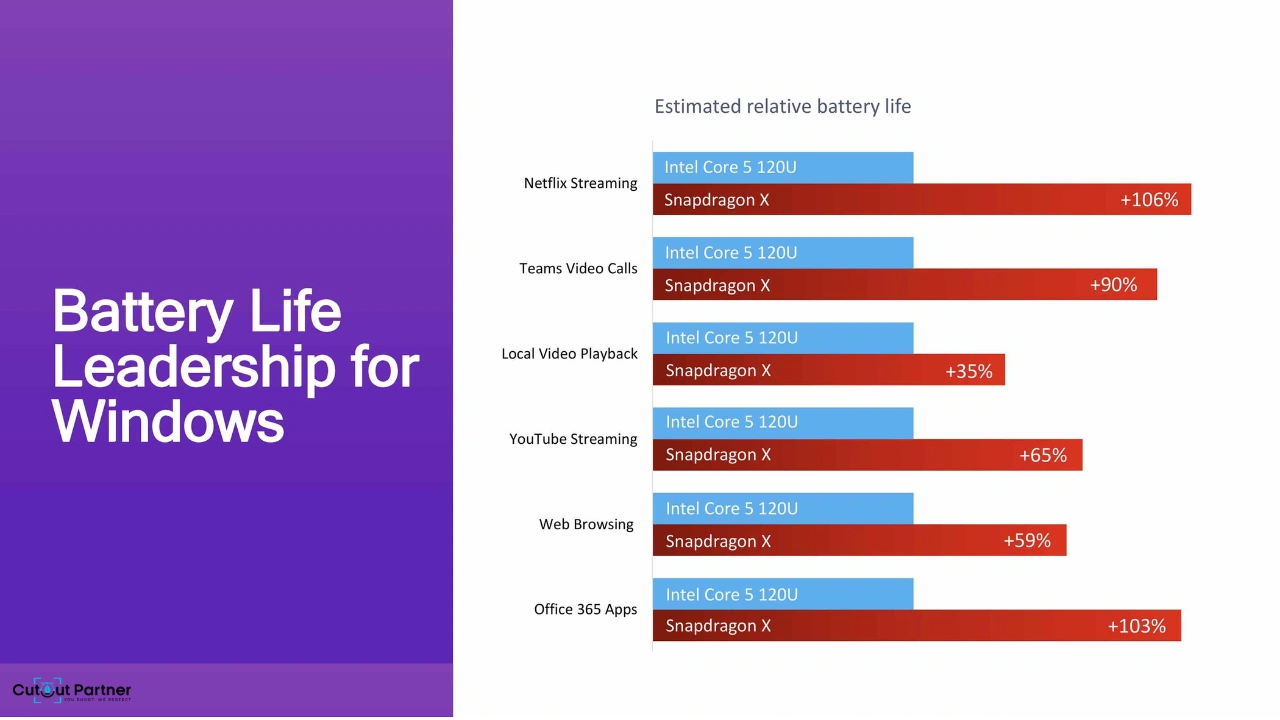
Qualcomm’s Snapdragon X Elite and X Plus chips introduced a new generation of Surface devices in 2024. These processors are based on Arm architecture and focus on delivering strong performance while using less power.
Key Specs:
- 12 powerful cores (up to 3.8GHz, with boost up to 4.3GHz on select cores)
- Built-in Adreno GPU for smooth graphics performance
- 45 TOPS NPU for fast AI tasks
- Supports up to 64GB LPDDR5x RAM
Main Advantages:
Excellent battery life:
Snapdragon X devices can last a very long time on a single charge. For example, the 15-inch Surface Laptop can deliver up to 20+ hours of video playback, making it ideal for travel or working on the go.
Cool and quiet performance:
These devices stay cool and often run without loud fans. Some models are even fanless, giving you a silent working experience.
Fast and responsive feel:
Snapdragon X laptops wake instantly and feel very smooth, similar to using a tablet or smartphone.
Overall, Snapdragon X is a great choice if you care most about portability, long battery life, and working without being plugged in.
Intel Lunar Lake: Smarter and More Efficient x86 Performance
Intel’s Lunar Lake (Core Ultra 200V) brings a fresh upgrade to traditional laptop processors. It still uses x86 architecture, but with big improvements in power efficiency and overall performance.
Key Specs:
- New Lion Cove performance cores with Skymont efficiency cores
- Built-in LPDDR5X memory (16GB or 32GB, fixed on the chip)
- Xe2 integrated GPU for stronger graphics performance
- Up to 48 TOPS NPU for AI-powered tasks
Main Advantages:
Full app compatibility:
Lunar Lake supports all Windows apps, drivers, and software without any issues. You won’t have to worry about programs not working.
Better graphics performance:
The new Xe2 GPU is a big step forward. It performs better than Snapdragon X graphics, which is helpful for photo editing, creative work, and even light gaming.
Strong and stable performance:
Lunar Lake handles long editing sessions and heavy tasks smoothly, offering a good balance between CPU and GPU performance.
Snapdragon X vs Intel Lunar Lake: Architecture Explained Simply
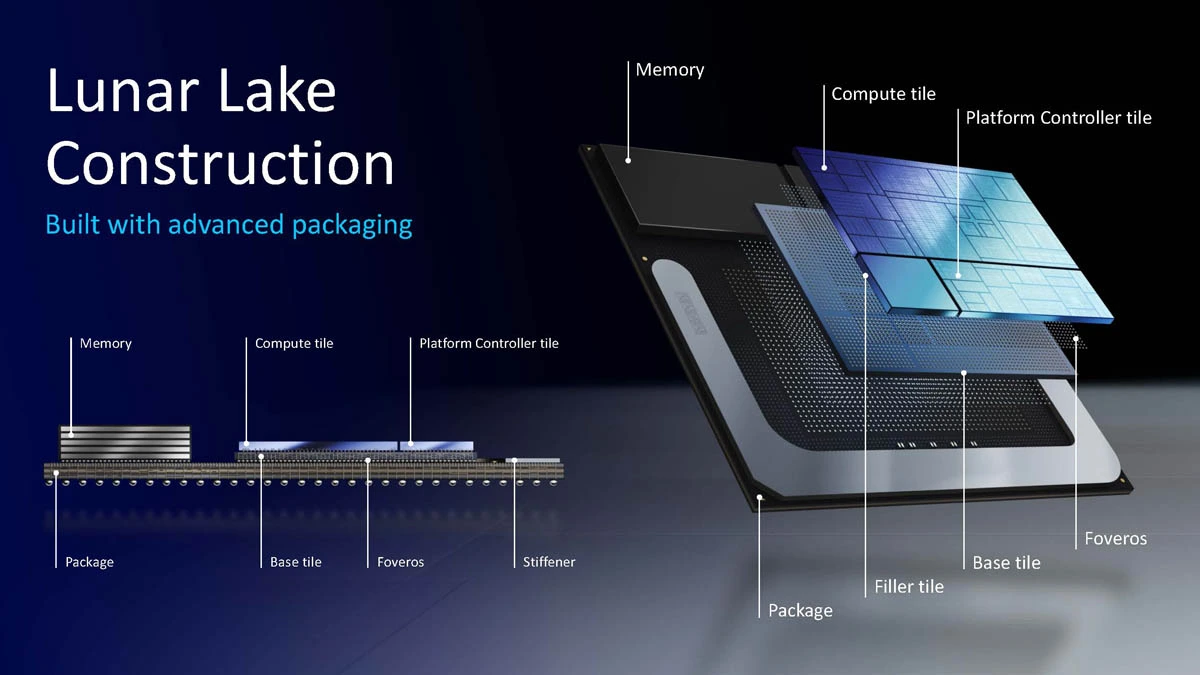
Snapdragon X (Arm) and Intel Lunar Lake (x86) are built on two different types of processor designs. You can think of them as two different “languages” that computers use to run apps. Windows works on both, but there’s an important difference.
Arm vs x86 (Basic Idea):
Snapdragon X uses Arm architecture, while Lunar Lake uses traditional x86. Most Windows apps are originally made for x86, so when they run on an Arm chip, they may need translation.
Microsoft has improved this with a system called Prism in Windows 11, which helps Arm devices run those apps much better. Still, apps run most smoothly when they are designed specifically for the processor (native apps), which gives Intel Lunar Lake an advantage in compatibility.
Built-in Memory (Lunar Lake):
Intel Lunar Lake includes memory directly on the chip. This improves speed and power efficiency. However, it also means you must choose your memory (16GB or 32GB) when buying the device—you can’t upgrade it later.
CPU, GPU, and NPU – What Do They Do?
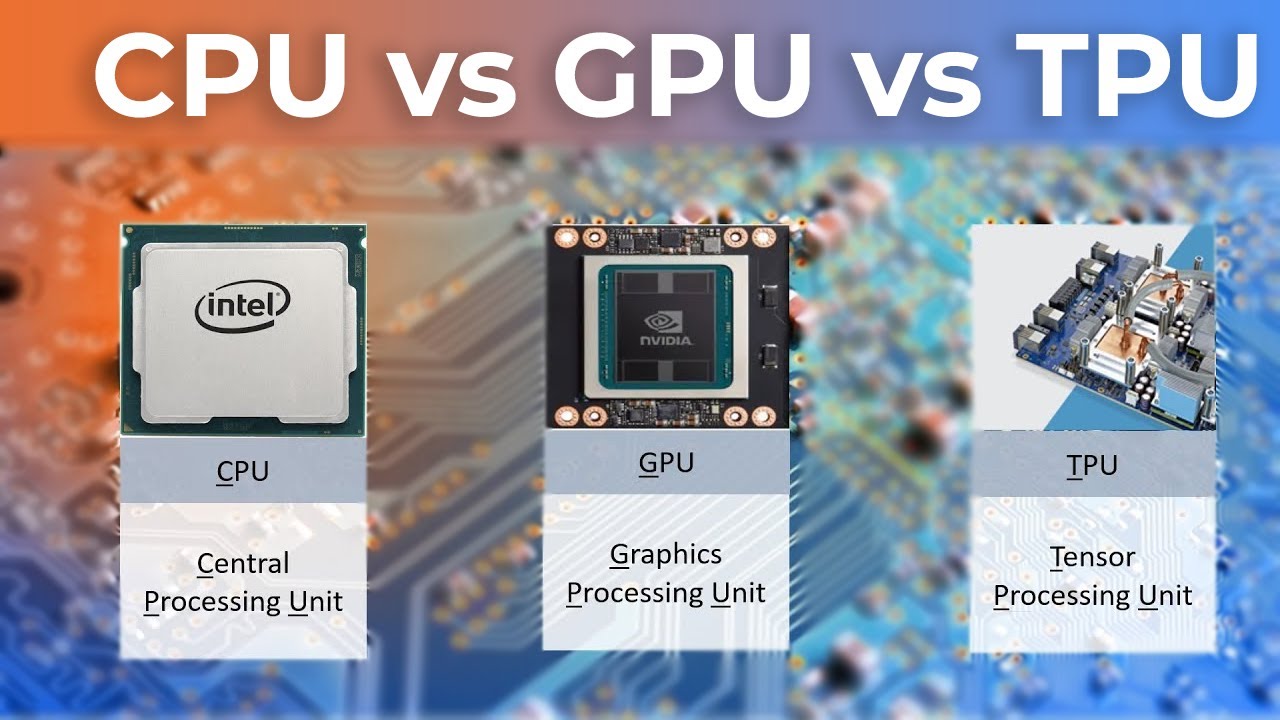
- CPU (Central Processing Unit): Handles everyday tasks like running apps, browsing, and multitasking
- GPU (Graphics Processing Unit): Manages graphics, photo editing, video work, and some AI tasks
- NPU (Neural Processing Unit): Handles AI features like image effects, background blur, and live captions
AI Performance (NPU Power):
Intel Lunar Lake offers up to 48 TOPS of AI performance, while Snapdragon X delivers around 45 TOPS. Snapdragon reached Microsoft’s Copilot+ requirements first, but both processors now easily support Windows AI features.
Snapdragon X vs Intel Lunar Lake: Real Performance Made Simple
When it comes to real-world performance, both Snapdragon X and Intel Lunar Lake feel fast in everyday use—but there are some key differences depending on what you do.
CPU Performance (Everyday Speed)
- Snapdragon X: Feels very smooth and responsive for daily tasks like browsing, editing photos, and multitasking. Its efficient design helps keep performance steady without heating up.
- Lunar Lake: Slightly better for heavy, long tasks like coding, rendering, or exporting large photo projects. It handles sustained workloads more strongly.
Graphics Performance (GPU Power)
- Snapdragon X: Good enough for basic graphics work, casual editing, and light creative apps.
- Lunar Lake (Xe2 GPU): A big improvement in graphics. It performs much better than Snapdragon X, making it a stronger choice for photo editing, creative software, and even light gaming.
AI Performance (NPU Power)
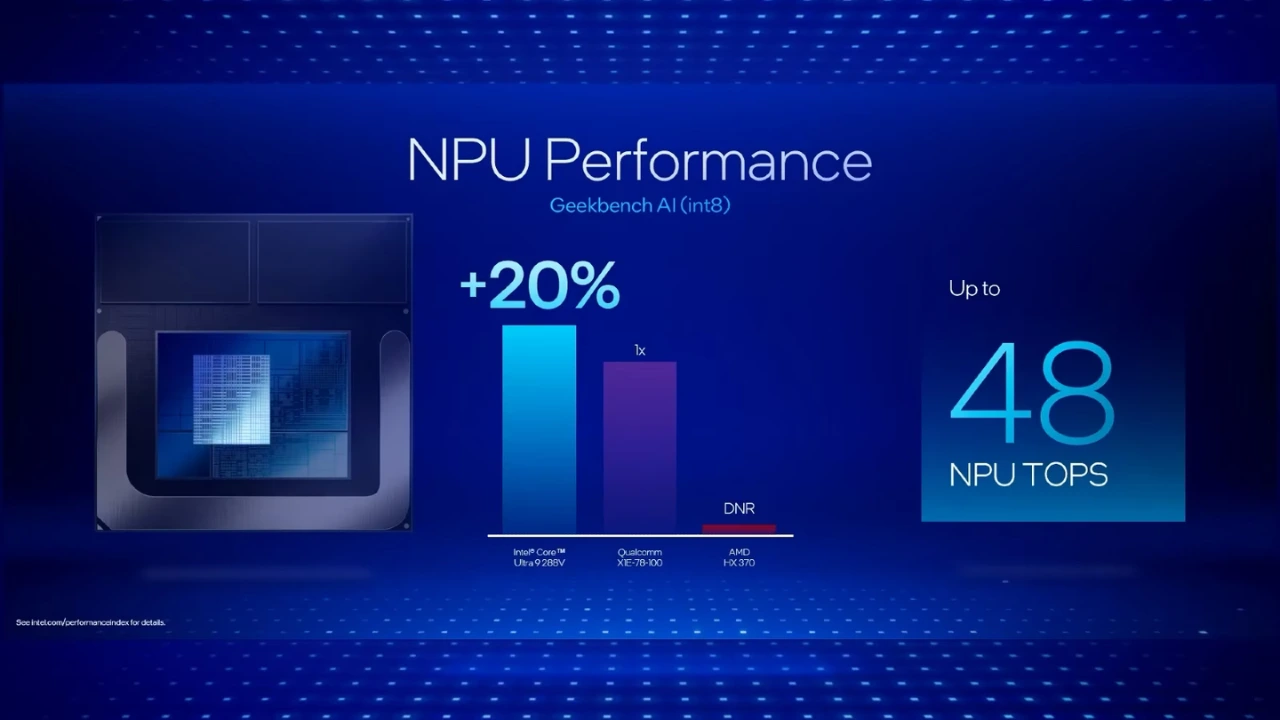
- Snapdragon X offers around 45 TOPS
- Lunar Lake goes up to 48 TOPS
In real use—like background blur, voice typing, or AI photo tools—you won’t notice much difference. Both run modern AI features smoothly.
Snapdragon X vs Intel Lunar Lake: Battery Life
Battery life is one of the biggest differences between these two processors.
- Snapdragon X: Offers excellent battery performance. You can expect 20+ hours of video playback and a full day (or more) of regular use. It’s a great choice for travelers, students, and anyone who works on the go.
- Lunar Lake: Usually delivers around 12–14 hours of battery life. That’s still enough for a full workday, but it doesn’t last as long as Snapdragon X.
Simple takeaway:
If long battery life is your top priority, Snapdragon X is the better option. If you don’t mind charging a bit sooner and want stronger performance or compatibility, Lunar Lake is still a solid choice.
Snapdragon X vs Intel Lunar Lake: Windows Compatibility
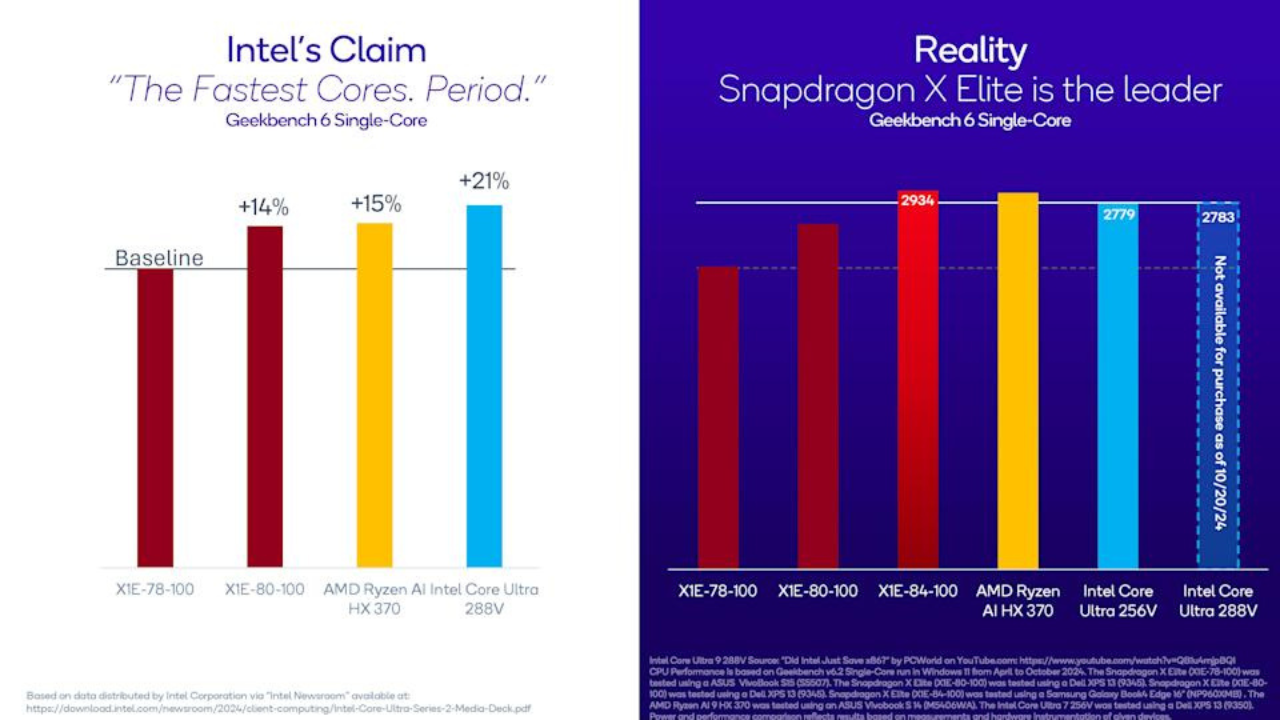
Snapdragon X (Arm-based):
- Runs Windows on Arm
- Uses Microsoft’s Prism system to run traditional apps faster
- Most popular apps like Microsoft Office, Teams, Chrome, Adobe apps, and VS Code work well
Intel Lunar Lake (x86-based):
- Runs all Windows apps natively
- No compatibility concerns
- Best for users who rely on older software, special tools, or specific plugins
Quick Rule of Thumb:
- If you use common apps like Office, browsers, Adobe tools, Slack, Notion, or coding tools, Snapdragon X works great today
- If you depend on older programs, special drivers, or want zero compatibility risk, Intel Lunar Lake is the safer and easier choice
Snapdragon X vs Intel Lunar Lake: AI Features Made Simple
Both Snapdragon X and Intel Lunar Lake fully support Microsoft’s Copilot+ features, so you’ll get the same AI tools on either device.
Key AI Features Available on Both:
- Live Captions with translation
- Windows Studio Effects (background blur, eye contact, and more)
- AI text and image generation
- Smart creative tools powered by AI
Snapdragon X was the first to meet Microsoft’s requirement of 40+ TOPS for AI performance. Now, Intel Lunar Lake (and newer chips) have reached similar levels, so both platforms are equally capable when it comes to AI.
Simple Takeaway:
No matter which processor you choose, you’ll get the same Copilot+ AI features. The chip you pick won’t change your AI experience—both are powerful and future-ready.
Benchmarks in Context (Keep It Simple)
Benchmark numbers can look impressive, but they don’t always tell the full story. Performance results can change depending on the test. What really matters is balance—having enough CPU power for your tasks, a GPU that handles your creative or light gaming needs, an NPU for AI features, and most importantly, battery life that fits your daily routine.
Intel Lunar Lake has improved a lot in efficiency and now delivers strong battery results. However, Snapdragon X devices still lead when it comes to all-day battery life, especially within Microsoft’s Surface lineup.
Which Surface Should You Choose?
For students & everyday use (browsing, documents, video calls):
Go with Snapdragon X (Surface Laptop 7 or Surface Pro 11). It offers a quiet, cool experience with excellent battery life—perfect for long days at school or commuting. It also feels very smooth and responsive.
For office professionals using older tools or special devices:
Choose Intel Lunar Lake. It runs all apps and accessories without issues, so you don’t have to worry about compatibility. Plus, you still get good battery life and better graphics performance.
For creators (photo/video) and developers:
It depends on your tools.
- Pick Snapdragon X if your apps work well on Arm and you want long battery life.
- Pick Lunar Lake if you rely on specific plugins, drivers, or development tools that work best on x86. It keeps everything running natively and smoothly.
For casual gaming:
Lunar Lake is the better choice thanks to its improved Xe2 graphics. It handles light gaming better than the Snapdragon X. Still, for serious gaming, a laptop with a dedicated GPU is recommended.
World’s Most Powerful NPUs for Next-Gen AI PCs
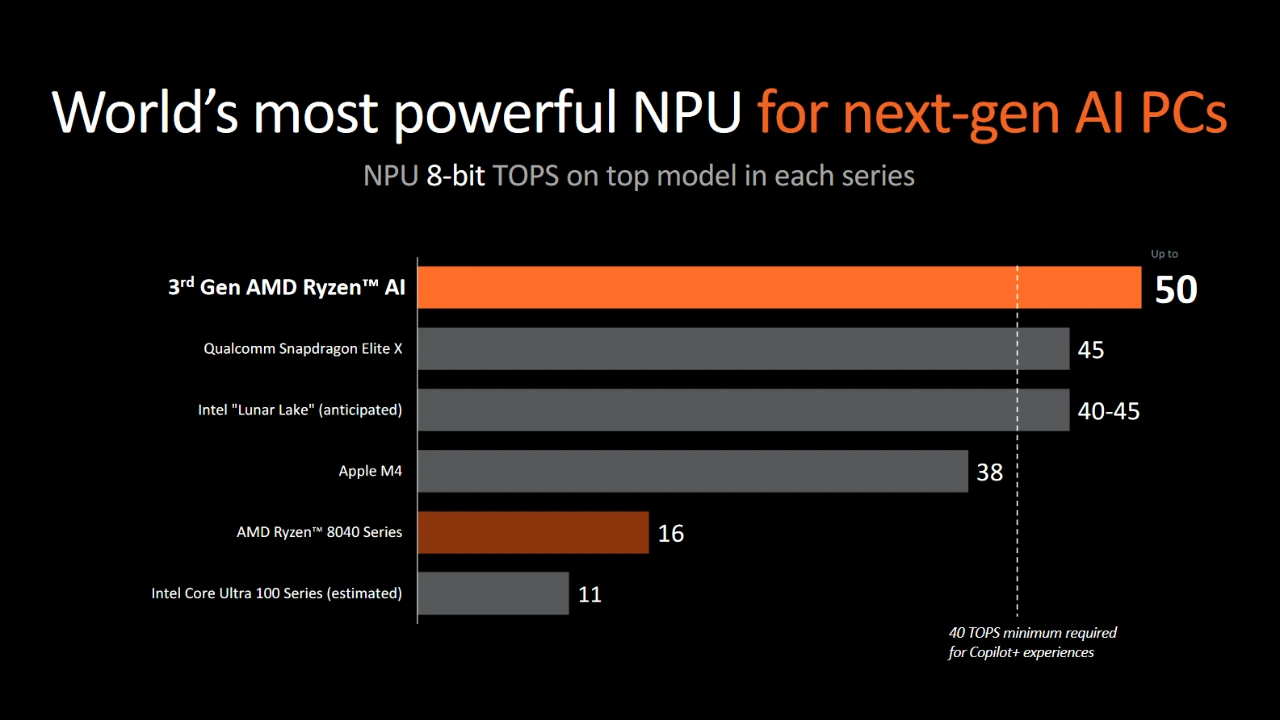
The rise of AI PCs has made Neural Processing Units (NPUs) a key component in modern computing. NPUs are designed to handle AI workloads such as image enhancement, background removal, real-time effects, voice processing, and machine learning tasks more efficiently than traditional CPUs or GPUs. Leading tech companies are now integrating powerful NPUs into their latest processors to deliver faster, smarter, and more efficient computing experiences.
AMD Ryzen 8040 Series
The AMD Ryzen 8040 series introduces an upgraded AI engine built into the chip, enabling efficient on-device AI processing. With improved Ryzen AI technology, these processors can handle tasks like image editing, video enhancements, and AI-assisted workflows while maintaining strong overall CPU and GPU performance. This makes them well-suited for creators and professionals who rely on balanced performance and efficiency.
Qualcomm Snapdragon X Elite
Snapdragon X Elite is one of the most advanced ARM-based platforms with a highly capable NPU designed for AI workloads. It excels in power efficiency while delivering strong AI performance for tasks like image processing, generative AI tools, and real-time enhancements. Its always-on AI capabilities make it ideal for thin, lightweight laptops focused on mobility and long battery life.
Intel Lunar Lake (Core Ultra Series 2)
Intel’s Lunar Lake processors feature a next-generation NPU integrated directly into the chip, designed for efficient local AI processing. Combined with improvements in CPU and GPU architecture, Lunar Lake delivers strong performance for creative applications, including photo editing, AI masking, and intelligent enhancements. It is optimized for responsiveness and compatibility across the Windows ecosystem.
Apple M4 Chip
Apple’s M4 chip includes a highly optimized Neural Engine that powers advanced AI and machine learning tasks across macOS devices. Known for its tight hardware-software integration, the M4 delivers exceptional performance in creative applications such as photo and video editing, AI-driven filters, and computational photography, all while maintaining excellent energy efficiency.
AMD Ryzen 8000 Series (3rd Gen AI PCs)
The Ryzen 8000 series continues AMD’s push into AI computing with enhanced NPU capabilities. Built to support modern AI workloads, these processors improve performance in tasks like real-time editing, background processing, and AI-assisted creative tools. They offer a solid balance of CPU power, integrated graphics, and AI acceleration.
Intel Core Ultra 100 Series
Intel Core Ultra 100 series processors introduced one of Intel’s first dedicated NPUs for AI PCs. These chips bring AI acceleration to everyday computing tasks, enabling features like background blur, noise reduction, and intelligent video processing. While earlier than Lunar Lake, they laid the foundation for Intel’s AI-focused roadmap with improved efficiency and AI handling capabilities
So, Which One Wins? Snapdragon X vs Intel Lunar Lake for Photo Editing
Intel Lunar Lake generally comes out ahead for serious photo editing.
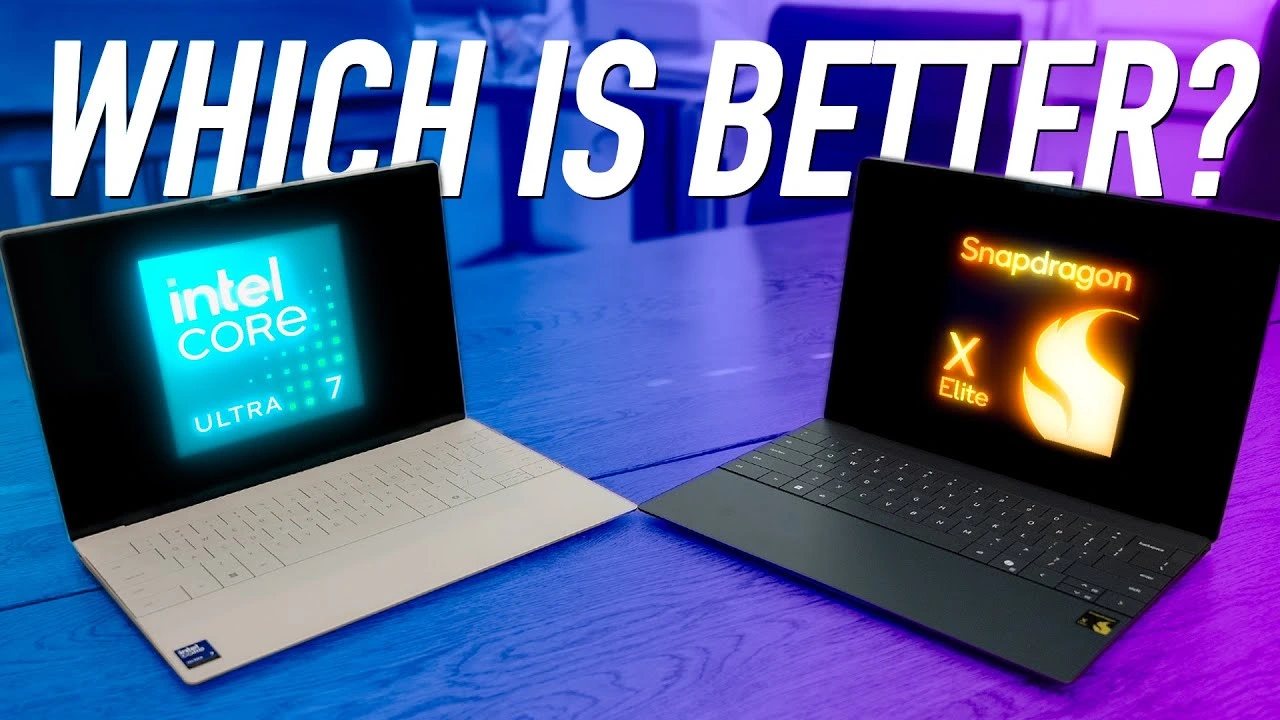
Reviews and comparisons show that Lunar Lake tends to feel more dependable and smoother when working with apps like Photoshop and handling heavy editing tasks, large RAW files, and sustained workflows. Its mature x86 support and stronger tuning for creative software make real-world editing feel more consistent and stable.
Snapdragon X still has real strengths, especially in battery life and efficiency. Users consistently report excellent battery timing and a very responsive experience for lighter editing, travel, and everyday tasks. But some photo editing tools and plugins can behave oddly or run slower because of translation layers required for Arm.
In short:
Intel Lunar Lake wins for most photo editing workloads — faster previews, steadier exports, and better compatibility with creative tools.
Snapdragon X is strong for basic editing, long battery life, and cool, quiet use — but it’s not quite as polished for heavy editing tasks yet.
Bottom line:
- If photo editing is a big part of your work, Intel Lunar Lake is the safer, more capable choice.
- If you edit casually and want all-day battery life and mobility, Snapdragon X is still a solid pick.
Comparison Questions Answered (FAQ)
Can Snapdragon X run all Windows apps?
Almost all popular Windows apps run well on Snapdragon X, either natively or through Microsoft’s Prism translation layer. However, some older software, drivers, or niche plugins may not work perfectly. If you rely on specialized tools, Intel Lunar Lake is the safer option.
Do both chips support Copilot+ AI features?
Yes. Both Snapdragon X and Intel Lunar Lake meet the Copilot+ requirement (40+ TOPS NPU) and support the same AI features, including Studio Effects, live captions, and AI-powered creative tools.
Is Intel Core Ultra Lunar Lake better than Snapdragon X Elite?
It depends on your needs. Lunar Lake generally performs better in graphics and offers full x86 compatibility, making it ideal for professional photo editing and older software. Snapdragon X Elite focuses on battery life, cooler performance, and smooth everyday use. Both support Copilot+ AI features.
Is Snapdragon X better than Intel?
Snapdragon X is better in terms of battery life, efficiency, and quiet operation. However, Intel Lunar Lake leads in compatibility and graphics performance. Snapdragon is great for portability, while Intel is better for heavier workloads and broader software support.
Is Snapdragon X better than Intel i5?
Compared to older Intel Core i5 processors, Snapdragon X often performs better in efficiency, AI tasks, and battery life. However, compared to newer Lunar Lake chips (which replace older i5/i7 lines), the difference is more balanced—Snapdragon wins on endurance, while Intel leads in GPU performance and compatibility.
Is the Snapdragon X processor good?
Yes, Snapdragon X Elite is a strong and modern processor. It delivers excellent battery life, smooth performance, and advanced AI capabilities. It’s a great choice for everyday users, students, and casual creators who value portability and long unplugged usage.
Final Verdict:
Performance-Focused Photo Editing For users whose priority is performance in real photo editing workflows, Intel Lunar Lake generally holds the edge. Its native x86 support, strong single-core performance, and better integrated graphics make it a better match for demanding editing tasks, especially with software like Adobe Lightroom Classic and Photoshop with plugins.
Choosing between Snapdragon X and Intel Lunar Lake for photo editing ultimately comes down to your priorities and workflow. Both processors are powerful and fully capable of handling modern photo editing tasks, but they excel in different areas.
If your work involves heavy editing, large image files, professional tools, and plugins, Intel Lunar Lake is the better choice. Its stronger graphics performance, native x86 compatibility, and more consistent behavior with creative software make it a more reliable option for demanding photo editing.
That said, Snapdragon X remains compelling for users who edit primarily with modern ARM-optimized apps and who value long battery life and quiet operation. Its efficiency and smooth everyday performance make it an excellent choice for many creatives.
Intel Lunar Lake stands out as the more reliable choice at the moment, delivering a smoother experience in applications like Photoshop, along with stronger performance in local AI-driven tasks and fewer compatibility concerns.
Qualcomm Snapdragon X Elite offers impressive efficiency and shows great promise for the future, especially for lightweight and mobile workflows. However, for users who edit photos regularly and depend on consistent, professional results, Lunar Lake currently provides a more stable and dependable performance overall.
Need any flawless editing work? Get in touch with Cutout Partner for high-quality, reliable, and professional photo retouching services. Our expert team ensures clean, natural, and polished results that help your images stand out and meet industry standards.