Product images on Shopify play a major role in how your store performs. In 2026, with millions of stores competing for attention, following platform image requirements is no longer optional—it is the basic standard that shapes how customers see your products.
Whether you are starting a new store or improving an existing one, knowing Shopify’s image guidelines helps you keep your visuals consistent, improve page loading speed, and display products clearly. This guide explains the main image specifications, formats, and practical tips to ensure your product images support conversions instead of slowing down your store.
Understanding Shopify’s Technical Image Specifications
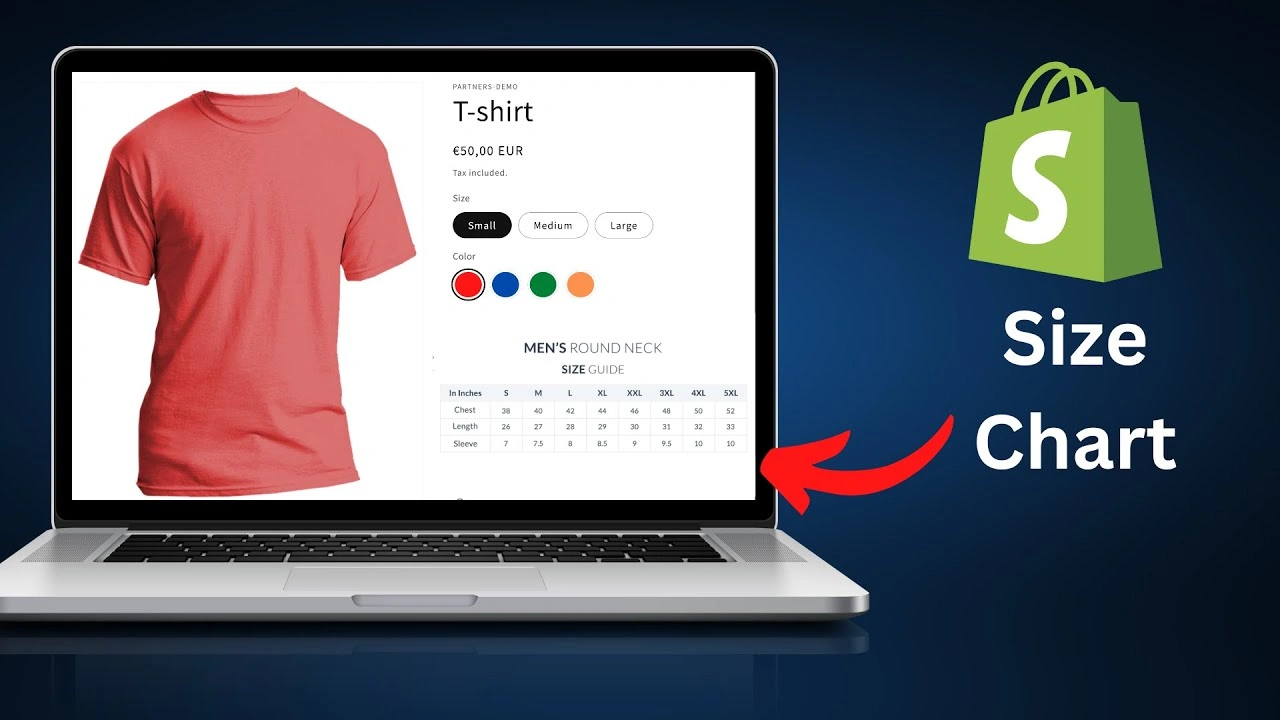
Shopify supports several image formats, and choosing the right one is important for both quality and performance. The platform accepts JPG, PNG, GIF, and WebP formats, each suited for different types of product images.
The maximum file size allowed is 20 MB per image, but using very large files is not recommended. For better performance and faster loading, it’s best to keep product images between 200–300 KB.
Recommended Dimensions and Aspect Ratios
Shopify can handle images up to 5460 × 8640 pixels, but using smaller, optimized sizes works better in practice.
Common recommended sizes include:
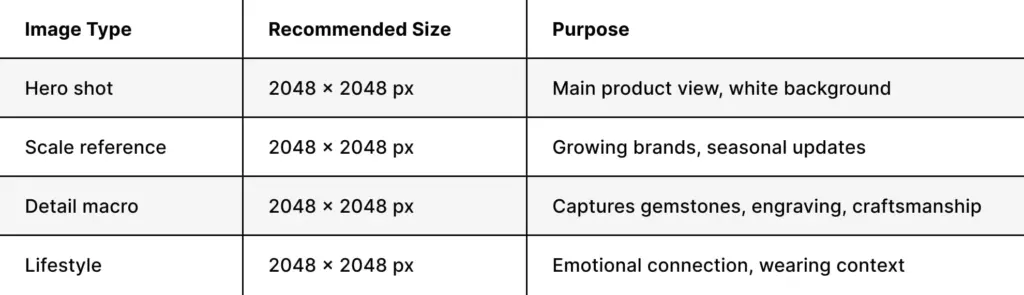
- Square (1:1): 2048 × 2048 pixels for main product images
- Vertical (2:3): 2048 × 3072 pixels for apparel and fashion items
- Horizontal (3:2): 3072 × 2048 pixels for lifestyle images
- Minimum size: 1024 × 1024 pixels for proper zoom functionality
Square images are the most widely used because they fit well across Shopify themes. They display consistently in product grids, collection pages, and product detail pages, helping maintain a clean and uniform store layout.
File Format Selection Strategy
Choosing the right image format depends on your product type and overall brand style. JPG is the most commonly used format for product photography because it offers good compression while maintaining high image quality. It works well for photos that include colors, shadows, and gradients.
PNG is best when you need transparency or sharp edges. It is ideal for products like jewelry, accessories, or items that may be placed on different backgrounds. However, PNG files are usually larger in size compared to JPG.
WebP is a modern image format that provides better compression while keeping high quality. By 2026, it is widely supported by most browsers. Shopify also helps by automatically converting uploaded JPG and PNG images into WebP for compatible browsers, improving performance and loading speed.
Optimizing Images for Different Product Categories
Different types of products require different photography styles, which affects how you prepare images for Shopify product image requirements.
Apparel and Fashion Photography
Clothing needs clear visuals because customers cannot physically try the product. Your images should clearly show fit, fabric, and color accuracy.
A good image structure for fashion includes:
- Front view on model (main image)
- Back view on model
- Close-up detail shots (fabric, stitching, buttons)
- Flat lay or hanger shots to show shape
- Lifestyle images for real-world context
Maintaining accurate color is very important. Sometimes Shopify’s image processing may slightly adjust colors, so it’s a good idea to review and fine-tune your images after uploading.
Jewelry and Small Accessories
Jewelry products require a different approach because they need to look detailed and attractive even at small thumbnail sizes. Clear focus, proper lighting, and high-resolution images are essential to highlight fine details and maintain visual appeal within Shopify product image requirements.
Beauty and Skincare Products
Beauty products work best when you combine clean product shots with lifestyle images that feel natural and appealing. Using proper skincare photography techniques helps show both the product details and the results it can deliver.
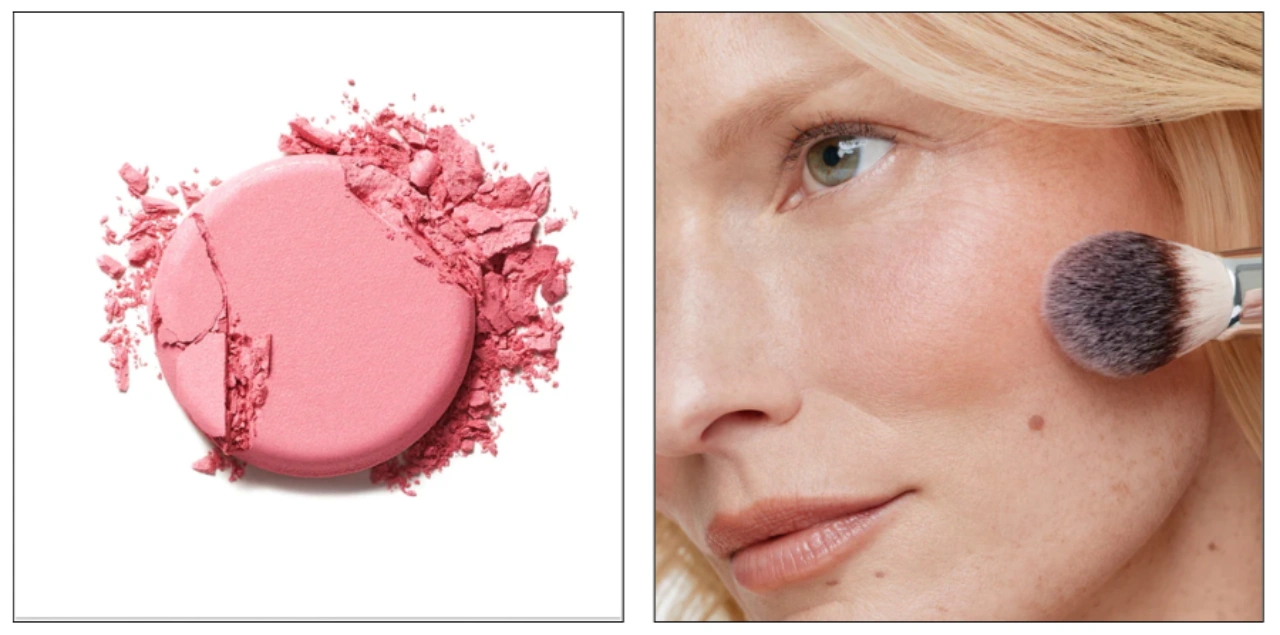
For beauty product listings, a good image set includes:
- Front view of the packaging with clear label visibility
- Close-up of the product texture or when it is dispensed
- Size or scale comparison to help customers understand volume
- Lifestyle image showing how the product is used
- Before-and-after or results images (only if accurate and honest)
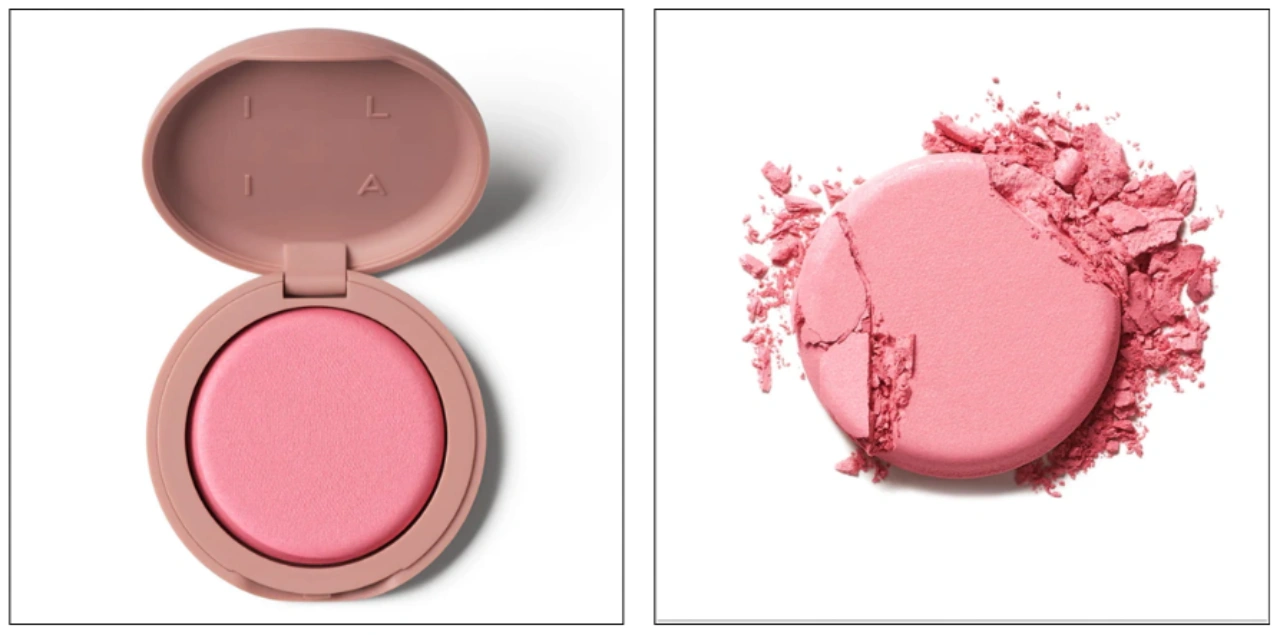
This mix of images helps customers better understand the product, builds trust, and improves overall shopping confidence on your Shopify store.
Technical Optimization Beyond Basic Requirements
Meeting Shopify’s basic product image requirements is only the first step. True optimization focuses on creating images that load quickly while still looking sharp and professional across all devices.
File Size Reduction Without Quality Loss
Large image files can slow down your store, especially on collection pages with multiple products. Even though Shopify allows large files, using smaller, optimized images improves performance and user experience.
Recommended file sizes:
- Hero images: 100–150 KB
- Lifestyle images: 150–200 KB
- Detail close-ups: 80–120 KB
You can use tools like ImageOptim, TinyPNG, or Squoosh to compress images and reduce file size without noticeable quality loss. Always resize images before uploading—avoid uploading oversized images and relying on Shopify to scale them down.
Color Space and Profile Management
Shopify uses the sRGB color space for displaying images. If you upload images in Adobe RGB or ProPhoto RGB, the colors may appear different to customers.
To avoid this, always convert your images to sRGB before uploading. Most editing tools include this option during export. This simple step helps maintain accurate colors and ensures your product looks consistent across all devices.
Creating Consistent Product Photography Standards
Maintaining consistency across your product catalog helps build trust with customers and creates a more professional-looking store. When all product images follow the same style, shoppers can focus on the products instead of being distracted by differences in presentation.
Establishing Your Visual Guidelines
To keep your images consistent, define clear standards for every shoot, such as:
- Lighting setup: Keep lighting, shadows, and highlights uniform
- Background: Use pure white (RGB 255, 255, 255) or branded backgrounds
- Product positioning: Center-align products with consistent spacing
- Aspect ratio: Maintain the same format (square, vertical, or horizontal) across categories
- Image sequence: Follow the same order (front, back, detail, lifestyle) for every product
Many successful Shopify stores use minimalistic photography to create clean, distraction-free visuals that highlight the product clearly.
Background Requirements for Different Use Cases
Using both white backgrounds and lifestyle images is the best approach. A clean background is ideal for the main product image, as it works well across different layouts and platforms, while lifestyle images help show context and usage. Combining both ensures flexibility and a better shopping experience for customers.
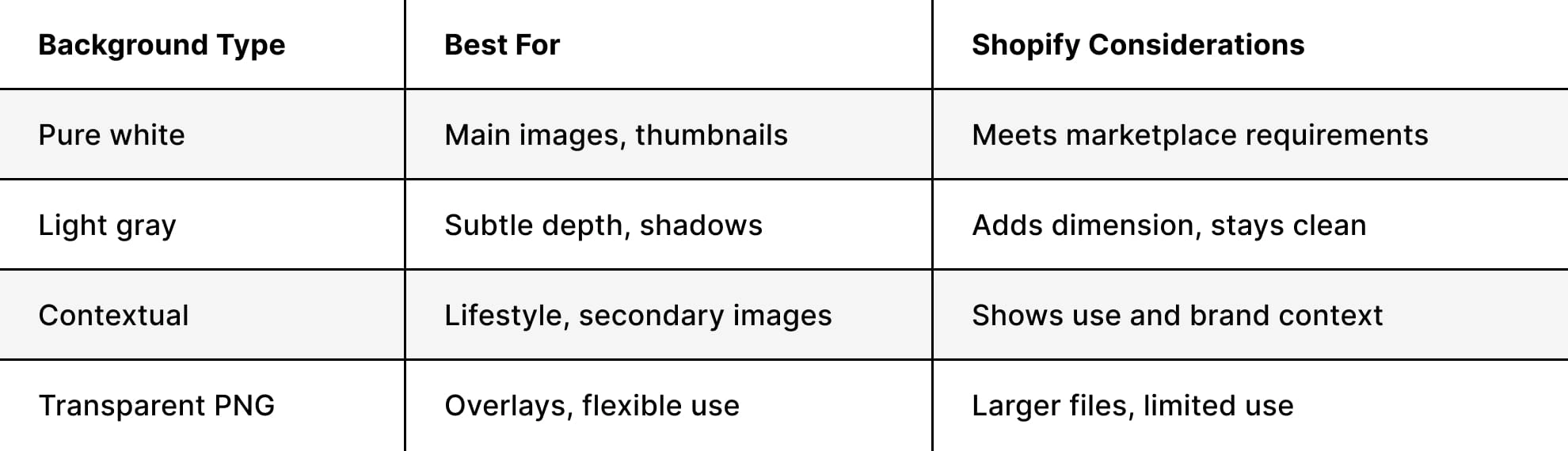
Understanding different types of product photography workflow helps you choose the right background styles and combine them effectively within each product’s image gallery. By using a mix of clean product shots and lifestyle images, you can present your items in a more complete and appealing way.
This approach allows you to highlight product details with simple backgrounds while also showing real-world usage through styled scenes. As a result, customers get a clearer understanding of the product, which improves confidence and supports better purchasing decisions.
Mobile Optimization Considerations
In 2026, more than 70% of Shopify traffic comes from mobile devices, making mobile optimization a key part of Shopify product image requirements. Images that look clear on a desktop may appear too small or unclear on a phone screen.
Responsive Image Strategy
Shopify automatically creates different image sizes from your uploads and serves the best version based on the user’s device. However, this works best when your original images are properly prepared and optimized.
It’s important to test how your images appear at common mobile widths, such as:
- 320px (small smartphones)
- 375px (standard iPhones)
- 414px (larger phones)
- 768px (tablets in portrait mode)
Your product should remain clear and easy to understand even at smaller sizes. Important details like labels, textures, or patterns should still be visible in thumbnail views.
Touch-Friendly Zoom Functionality
Most Shopify themes include zoom features for product images, but they work best with high-resolution images. A size like 2048 × 2048 pixels allows smooth zooming without losing quality.
For products that require close inspection—such as jewelry, fabrics, or detailed packaging—enable zoom features in your theme settings. Upload high-resolution images while keeping file sizes optimized through compression to ensure both quality and performance.
Advanced Image Techniques for Competitive Advantage
Beyond meeting basic Shopify product image requirements, using advanced techniques can help your store stand out and create a more engaging shopping experience.
360-Degree Product Views
Interactive 360-degree views allow customers to see a product from all angles without needing video. This is especially useful for items like furniture, electronics, handbags, and other products with multiple details.
Shopify supports 360-degree views through apps, but all images used in the sequence must follow the same size and format. Consistent dimensions and file sizes across all frames ensure smooth rotation and better performance.
Lifestyle and Contextual Photography
While standard product images show the item clearly, lifestyle images help create an emotional connection with customers. These images show the product in real-world use, helping shoppers better understand its purpose and benefits.
Effective lifestyle images should:
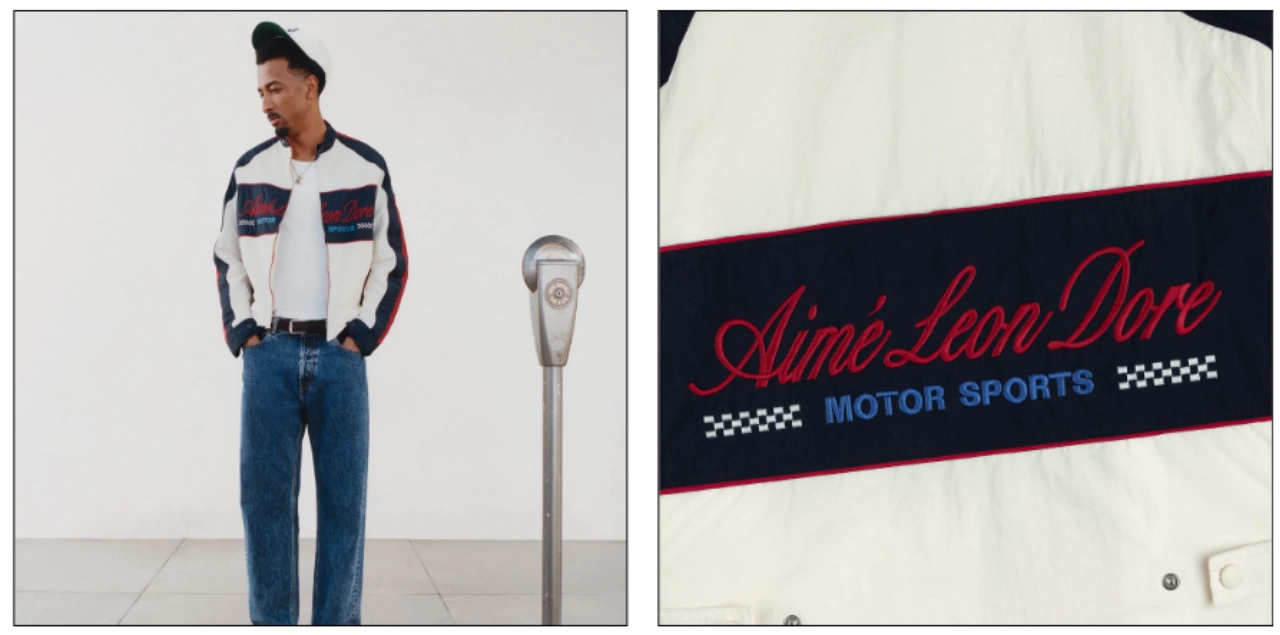
- Match the same dimensions as product images (e.g., 2048 × 2048 px)
- Clearly show the product within the scene
- Follow a consistent editing and visual style
- Tell a story about how the product is used
- Avoid clutter that distracts from the product
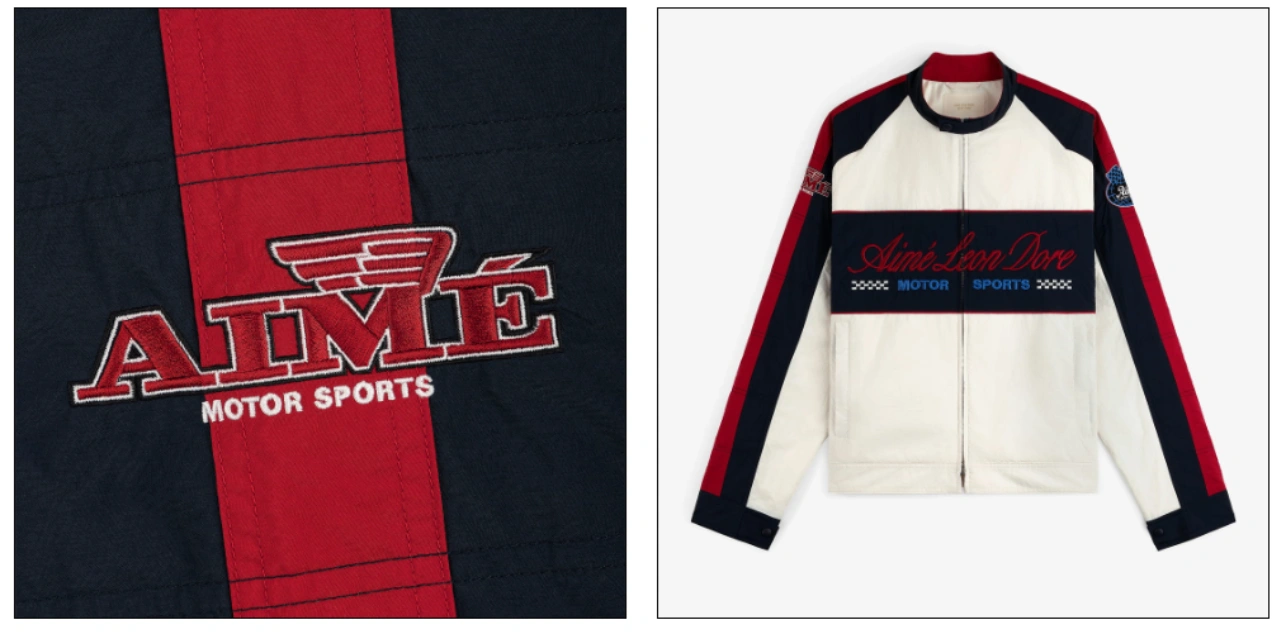
A balanced image gallery often alternates between product shots and lifestyle images. For example: main product image, lifestyle scene, close-up detail, another lifestyle shot, and packaging or size reference. This approach improves engagement and helps customers make confident buying decisions.
Special Considerations for Different Shopify Plans
Your Shopify plan can influence how you manage images, but the core Shopify product image requirements remain the same across all plans.
Upload Limits and File Management
All Shopify plans—Basic, Shopify, and Advanced—support the same maximum file size of 20 MB and maximum image dimensions of 5460 × 8640 pixels. However, differences appear in storage management and how efficiently you handle large numbers of product images.
For stores with thousands of SKUs, especially Shopify Plus merchants, it’s important to follow structured image management practices to maintain consistency and organization at scale.
Theme-Specific Image Requirements
Different Shopify themes may display product images in different ways. Some themes crop images to fixed aspect ratios, while others adjust to fit your original image dimensions within the layout.
Before starting large-scale product shoots, it’s a good idea to test your theme:
- Upload sample images with 1:1, 2:3, and 3:2 aspect ratios
- Check how images appear on desktop and mobile devices
- Review product pages, collection grids, homepage sections, and search results
- Ensure thumbnails and previews display correctly
Testing your theme in advance helps you identify the best aspect ratio for your store and prevents unnecessary reshoots, saving both time and resources.
Alternative Image Solutions and Workarounds
Sometimes, standard product photos are not enough to clearly show product features, variations, or functionality. In such cases, using alternative media can improve how customers understand your products within Shopify product image requirements.
Using GIFs for Product Variations
Animated GIFs can help display color options, simple movements, or product transformations. Shopify supports GIF format, making it possible to create short looping visuals that:
- Show different product colors or variations
- Demonstrate how a product works in motion
- Highlight size differences or comparisons
- Emphasize key features with simple animations
However, GIF files can become large, so optimization is important. Keep them under 500 KB by limiting frames, reducing dimensions (around 1600 × 1600 px works well), and using compression tools like Ezgif or Giphy’s GIF maker.
Incorporating Video Alongside Images
Video is another powerful addition to product pages, but it should complement—not replace—product images. While videos help explain features and usage, still images remain essential for meeting Shopify product image requirements.
The first image in your product gallery should always be a high-quality still image because:
- It appears in collection grids and search results
- It loads faster than video
- It displays correctly across all devices and layouts
- It maintains visual consistency across your store
Additional product gallery slots can include videos (within size limits), while the remaining images provide fallback visuals for users who may not watch the video. This combination creates a richer and more informative shopping experience.
Image Naming and SEO Optimization
The technical side of Shopify product image requirements goes beyond just resolution and file size. Proper file naming and alt text play a key role in improving search visibility, accessibility, and overall store organization.
Strategic File Naming Conventions
Before uploading images to Shopify, rename them with descriptive and keyword-focused filenames instead of generic camera names like “IMG_7234.jpg”. A well-structured filename helps search engines understand your content and keeps your media library organized.
A good naming structure typically includes:
- Product name or SKU
- Color or variation
- View angle or shot type
- Sequential numbering for multiple images
For example: leather-crossbody-bag-brown-detail-shot-02.jpg is far more effective than a default camera filename.
This approach improves:
- Image search visibility on search engines
- Internal organization for large product catalogs
- Team collaboration and consistency
- Long-term scalability when managing or migrating data
Alt Text Best Practices
Alt text is essential for both accessibility and SEO. Every product image should include clear, descriptive alt text that explains what the image shows.
Effective alt text should:
- Clearly describe the product and image content
- Include relevant keywords naturally (without stuffing)
- Stay within ~125 characters for screen readers
- Be unique for each image, even within the same product
Example of good alt text:
“Women’s black leather ankle boots with side zipper, front view”
Poor alt text example:
“Product image 1”
Well-optimized file names and alt text not only help search engines index your images but also enhance usability for all customers, making your Shopify store more discoverable and accessible.
Quality Control and Consistency Checks
Even when images meet all technical Shopify product image requirements, maintaining strict quality control ensures your product photos consistently meet professional standards before publishing. High-performing stores treat quality checks as a final, essential step in their workflow.
Pre-Upload Checklist
Before uploading images to Shopify, verify the following:
- Dimensions: Images follow your chosen standard (e.g., 2048 × 2048 px)
- File size: Optimized to under ~200 KB per image
- Format: JPG for standard photos, PNG only when transparency is required
- Color space: Converted to sRGB for accurate display across devices
- Focus: Product details are sharp and clearly visible
- Exposure: Balanced brightness without overexposed highlights or dark shadows
- Color accuracy: Matches the real-world appearance of the product
- Background: Consistent treatment (pure white or branded style)
- File naming: Descriptive and SEO-friendly filenames
- Alt text: Prepared and aligned with each image
Batch Processing for Efficiency
For stores with large inventories, manual editing is not scalable. Batch processing tools help maintain consistency while saving time. Software such as Adobe Lightroom, Capture One, or Photoshop Actions can be used to:
- Apply uniform color correction across multiple images
- Resize entire batches to exact dimensions
- Convert color profiles to sRGB in bulk
- Add branding elements or watermarks
- Export optimized files with consistent compression settings
A well-structured workflow from capture to upload ensures smoother operations and avoids bottlenecks in content production.
Common Mistakes to Avoid
Over-Compression Pitfalls
Reducing file size too aggressively can degrade image quality. Issues like pixelation, color banding, or loss of detail can negatively impact customer trust.
A practical approach is to test multiple compression levels:
- Export images at different quality settings (e.g., 90%, 80%, 70%, 60%)
- View them at actual display size
- Select the lowest quality where no visible degradation occurs
- Typically, 75–85% JPG quality provides the best balance
Inconsistent Image Sets
Inconsistency across product images can make a store look unprofessional. Common issues include:
- Mixed aspect ratios across similar products
- Different background styles or colors
- Uneven lighting or color tones
- Varying retouching styles
- Inconsistent use of lifestyle vs. studio shots
Creating standardized templates for photography and editing ensures uniform presentation across your catalog.
Ignoring Mobile Preview Images that look great on desktop may not perform well on mobile devices. Important details can become too small, and text may lose readability.
Always test images on real mobile devices—not just desktop previews or emulators—to ensure clarity, proper scaling, and visual balance across different screen sizes.
Preparing Images for Multi-Channel Selling
Many Shopify merchants expand beyond a single store and sell across multiple platforms such as Amazon, eBay, Instagram, and other marketplaces. Each platform has its own image guidelines, so preparing assets that align with Shopify product image requirements while remaining flexible is essential for efficiency and consistency.
Creating a Master Image Library
A well-structured master library allows you to repurpose high-quality visuals across different channels without re-shooting. Your master assets should include:
- Original RAW camera files for maximum editing flexibility
- Edited high-resolution PSD or TIFF files with layers preserved
- Exported high-resolution versions (3000+ pixels) for adaptability
- Platform-specific exports tailored for Shopify, Amazon, social media, etc.
This approach ensures you can quickly generate compliant versions for each platform while maintaining consistent visual quality.
Standard Size Conversions Across Platforms
Understanding how different platforms handle image dimensions helps streamline your workflow:
- Shopify: Works best with square images around 2048 × 2048 pixels and flexible backgrounds
- Amazon: Typically requires larger square images (around 2500 × 2500 pixels) with a pure white background for main images
- Instagram: Prefers 1080 × 1080 pixels with square formatting
- Facebook: Uses slightly larger square images, around 1200 × 1200 pixels
- Pinterest: Favors vertical images with a 2:3 ratio (e.g., 1000 × 1500 pixels) for better discovery performance
Starting with high-resolution master images ensures you can resize and adapt visuals for each platform without quality loss.
Why Choose Cutout Partner for Specialized Shopify Image Editing Services
Choosing the right partner for Shopify image editing can significantly impact how products are perceived and how well a store converts visitors into customers. Cutout Partner stands out as a specialized service provider focused on delivering high-quality visuals tailored for e-commerce platforms like Shopify.
One of the key advantages of working with Cutout Partner is their deep understanding of Shopify product image requirements, including dimensions, formats, background standards, and optimization techniques. Their team ensures every image is properly resized, compressed, and color-corrected to maintain consistency across product listings while meeting platform guidelines.
Another important benefit is their expertise in background removal, shadow creation, color correction, and retouching. These enhancements help products look clean, professional, and visually appealing, which builds customer trust and improves click-through rates. Consistent image presentation across an entire catalog also strengthens brand identity and creates a seamless shopping experience.
Additionally, Cutout Partner supports scalability for growing businesses. Whether managing a small product line or thousands of SKUs, their workflow is designed to handle bulk editing efficiently without compromising quality.
By outsourcing Shopify image editing to Cutout Partner, e-commerce businesses can save time, maintain visual consistency, and focus more on marketing and sales while ensuring their product images are optimized for maximum impact.
Final Thoughts on Multi-Channel Preparation
A strong image strategy goes beyond meeting Shopify product image requirements—it supports scalability across all sales channels. By maintaining a centralized, high-quality image library and planning for multiple formats from the start, you can efficiently deliver consistent, professional visuals everywhere your products appear.